Drop your worst Excel file.
Ask anything.
Your AI can read spreadsheets — when you're lucky. agentixl is the chat where luck isn't part of the stack: it sees your file the way you do, recalculates formulas, and edits without breaking a thing.
30 chat messages to start. No credit card.
Things people ask
- “Which tickets are critical?”
- “Rebuild the Q3 summary sheet from these rows.”
- “Why does this VLOOKUP return N/A?”
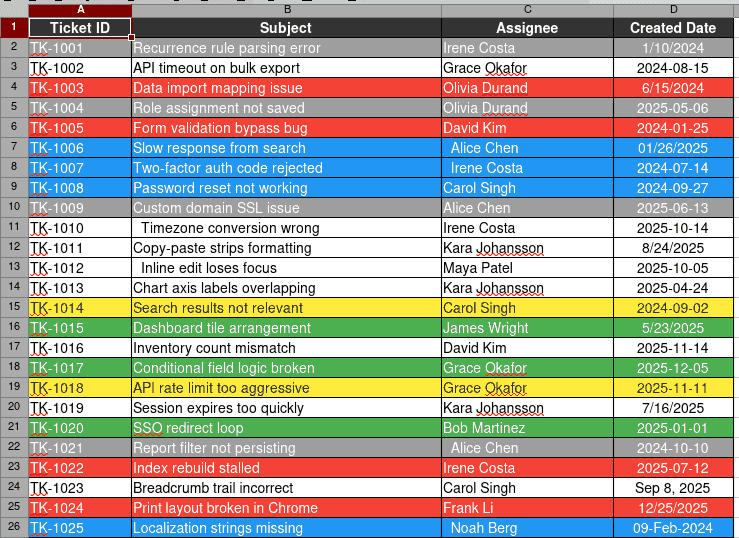
Your workbook rendered exactly as Excel shows it — colours, borders, merged cells and all. That is what the model reads.
Where your AI's luck runs out
Eight places where reading a spreadsheet through code quietly goes wrong. If one of them is your Tuesday morning, agentixl is for you.
Large files5,000+ rows
On the biggest cases in our benchmark, a code-writing agent averaged 0.50 accuracy against 1.00 for agentixl — and on two of them it returned no answer at all. Same model, same prompt, both runs.
Colour that carries meaning
Red for late, green for signed off, bold for the total line. None of it survives a dataframe: the column your colleague encoded in fill colour simply is not there.
Merged cells & double headers
A title merged across six columns, two stacked header rows, a blank line before the data starts. Flatten that to CSV and the structure you were reading disappears.
Legacy .xls and .ods
Files exported in 2003, LibreOffice documents, .xlsm workbooks full of macros. Half the tooling refuses them outright; the other half drops data without saying so.
Protected workbooks
Password-protected files and locked sheets. Hand agentixl the password and it opens the workbook, does the work, and locks it back — no "could you send an unprotected copy?".
Formulas that need recalculating
Cross-sheet VLOOKUP, INDEX/MATCH, array formulas. Reading the file gives you the formula text or a stale cached number. agentixl recalculates and answers with the real value.
Editing without breaking anything
Charts, pivot tables, macros, conditional formatting, column widths. agentixl patches the cells you asked about and leaves the rest of the workbook exactly as it was.
Assistants with no code execution
No Python sandbox, no notebook, no local setup. If your assistant can call a tool, it can open, read, and edit your spreadsheet.
Figures from ExcelExtract-Bench, our 69-case spreadsheet extraction benchmark. Both runs used the same small model and the exact same prompt — only the available tools differed. To be clear about scope: on clean, well-formed files a frontier model with a Python sandbox does the job just fine. The gap opens on big, messy, style-encoded workbooks and on smaller models.
Same file. Two ways of seeing it.
A real case from our benchmark: 84 support tickets. Each ticket's status exists only as the row's background colour — there is no status column anywhere in the file.
>>> pd.read_excel("support-tickets.xlsx").head(8).to_csv(index=False)

Ticket ID,Subject,Assignee,Created Date
TK-1001,Recurrence rule parsing error,Irene Costa,1/10/2024
TK-1002,API timeout on bulk export,Grace Okafor,2024-08-15
TK-1003,Data import mapping issue,Olivia Durand,6/15/2024
TK-1004,Role assignment not saved,Olivia Durand,2025-05-06
TK-1005,Form validation bypass bug,David Kim,2024-01-25
TK-1006,Slow response from search,  Alice Chen,01/26/2025
TK-1007,Two-factor auth code rejected  ,  Irene Costa,2024-07-14
TK-1008,Password reset not working,Carol Singh,2024-09-27
Four text columns. Ten of these 84 tickets are marked critical — nothing in this output says which ones.
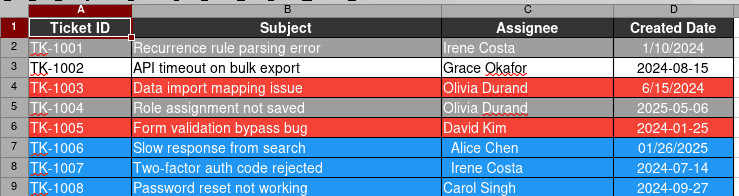
The same eight rows, with the colours intact. Red is critical, blue is pending, grey is closed — and the model reads the colour as data, the way you would.
Left: the actual output of pandas.read_excel() on the file, reproduced verbatim. Right: the same file rendered by the LibreOffice engine agentixl uses for previews and screenshots. Test case v2-style-color-only-status, 84 rows, ExcelExtract-Bench.
Three steps. No setup.
No Python, no add-in, no “could you save it as a CSV first?”. A browser and your file.
Drop your file
.xlsx, .xls, .xlsm, .ods — up to 50 MB, password-protected if it has to be. Formulas are recalculated on the way in, so the numbers you see are the real ones.
Ask in plain English
“Which tickets are critical?” “Rebuild the Q3 summary.” “Why is this VLOOKUP wrong?” agentixl explores the workbook, shows you the cells it is looking at, and answers.
Download the result
Still a real .xlsx — not a CSV, not a rewrite. Charts, pivot tables, macros and formatting are all where you left them.
Next month? Already handled.
Upload the new version and ask the same question. Someone added a column, renamed a department, moved a sheet — a macro would have crashed. agentixl looks at the file again and adapts.
Simple pricing
Start free on your own file. Upgrade when it becomes part of your month.
Free
Try it on a real file
- 30 chat messages to start — no card requiredone-off allowance, not a monthly refill
- 100 MCP tool calls / month
- 1 GB storage
- Every file format and every tool
Pro
For the reports that come back every month
- 1,000 chat messages / month
- 5,000 MCP tool calls / month
- 20 GB storage
- Priority support
For developers
The same engine is an MCP server: 25 tools to explore, screenshot, recalculate, patch and export spreadsheets from Claude, ChatGPT, Cursor or your own agent. One API key, no local runtime.
{
  "mcpServers": {
    "agentixl": {
      "url": "https://agentixl.com/api/mcp",
      "headers": {
        "Authorization": "Bearer YOUR_API_KEY"
      }
    }
  }
}Your next messy workbook
is already in your inbox.
Drop it in and ask the question you were about to spend an hour on. 30 messages free, no credit card.
Try it on your file — free